
HDD and SSD, Which Type of Storage Is Best for You ?
Введение

What are HDDs?
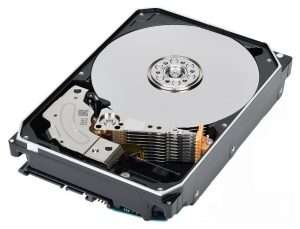
The main components of a hard disc drive (HDD) include the following key components:
Platters
Platters are round magnetic media used to store data in HDDs. They are usually made of aluminum alloy or glass material and coated with a layer of magnetic material. Platters are sealed inside the HDD to keep them clean and prevent physical damage.
Read/Write Heads
Read/Write Heads are responsible for reading and writing the data stored on the disc. They are very delicate and are suspended above the platter without touching the surface to avoid wear or scratching the platter. Each platter in an HDD has two read/write heads, one for the top and one for the bottom of the platter.
Actuator Arm
The actuator arm is used to move the read/write head to a specific track on the disc. It is usually controlled by an actuator called a Voice Coil Motor (VCM).
Disc Spindle and Motor (Spindle Motor)
The spindle is attached to all the discs and is driven by a motor that rotates the discs at high speed (usually 5400 RPM or 7200 RPM).
Control Circuit Board
The circuit board contains the brain of the HDD and is responsible for processing commands from the computer, controlling read and write operations, managing the data buffer, and performing other critical electronic functions.
Data Buffer or Cache
The Data Buffer is a small piece of fast RAM in the HDD that is used to temporarily store data that is about to be written to or read from the disc to improve the efficiency of data transfer.
Встроенное ПО
Firmware is the specialized software stored on the HDD that contains the instruction set required to perform HDD operations.
Enclosure
The enclosure is the external protective structure of the HDD, usually made of metal or plastic, which protects the internal components from physical damage.
Interface
What are SSDs ?
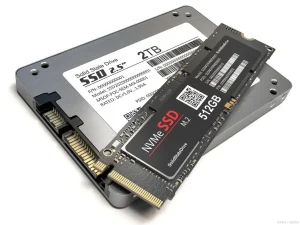
NAND Flash Memory Chips
This is the core component used to store data in an SSD.NAND flash is a non-volatile storage technology, meaning that the data stored in it will not be lost, even in the event of a power outage.NAND chips are usually found in the form of multiple chips, which can be MLC (Multi-Level Cells), They can be of different types such as MLC (Multi-Layer Cells), TLC (Tri-Layer Cells), or QLC (Quad-Layer Cells), and the number of these types of memory cells determines the amount of data that can be stored in each cell.
Controller
The controller is the brain of the SSD and is responsible for managing data storage and retrieval, handling read and write operations, and performing tasks such as wear leveling, rubbish collection, and error correction. The controller is also responsible for communicating with the computer and transferring data through interfaces (e.g., SATA, NVMe).
Кэш-память
Some SSDs include a DRAM cache that is used to temporarily store data and improve read and write performance. Caching speeds up the reading and writing of frequently accessed data.
Interface
SSDs are connected to the computer through an interface, and common interfaces include SATA (Serial ATA), NVMe (Non-Volatile Memory Express), PCIe (Peripheral Component Interconnect Express), and so on. The NVMe protocol is optimized for SSDs and offers higher data transfer speeds and lower latency than traditional SATA interfaces.
Enclosure
The enclosure is the external protective structure of the SSD that protects the internal components from physical damage. Enclosures can be made of metal or plastic and come in a variety of shapes and sizes, such as 2.5-inch, M.2, U.2, and so on.
Встроенное ПО
Firmware is the dedicated software stored on an SSD that contains the instruction set required to perform SSD operations, including managing the flash chip, optimizing performance, and ensuring data integrity.
Thermal Solutions
High-performance SSDs may include heatsinks or other thermal solutions to prevent overheating when operating under high loads.
Power management circuitry
Some SSDs may include power management circuitry to optimize energy consumption and extend battery life, particularly in mobile devices.
SSDs are designed to provide faster data access, higher endurance, and lower power consumption than traditional hard disc drives (HDDs). As technology advances, SSDs are increasing in storage capacity and decreasing in cost, making them an increasingly popular storage solution.
Working Principle of HDD
Hard discs are read and written using semi-random access, which allows the data in the hard disc to be read in any order, but not at the same speed as reading data from different locations. The magnetic head writes data to the platters by changing polarity through electromagnetic flow, and reads the data by rotating the platters and moving the head. When the head passes over the platter, the magnetic field of the platter itself causes a change in the electrical signals in the read coil, which enables data to be read and written.
- “Platters” are disc-like components found on HDD. Data is saved on platters utilizing an electrical charge.
- Сайт “read/write head” or actuation arms are the source of this electric charge. Where it should move on the platters is determined by the central processing unit and the control board software.
- The platters are located on a spindle.
- Each platter spins and is divided into sectors. One of the arms with magnetic heads is assigned to each platter.
- In turn, the sectors are further subdivided several thousandfold into bits; with every bit capable of receiving an electric charge. The head used for reading and writing reads the sector’s data bits and associated charges, which are then converted to a binary as ones or zeros.
- The platter’s sector arrangement has changed throughout the years as HDD has developed.
- The longitudinal recording was a feature of the initial hard disk design that positioned the sectors horizontally in relation to the rotating platter of the storage device.
- When the sectors were shrunk to increase the HDD storage limit, this horizontal arrangement started to cause issues.
- Loss of information would result from the bits’ Arbitrary charge flipping at such a tiny scale in response to temperature changes.
- According to the total size of the document, the CPU uses an area of the sector or sectors while writing data from the HDD.
- The CPU tells the hard drive to write the updated data in the next accessible sector when it happens.
- The time it takes to read the data increases with the distance between the first and this fresh sector. Even if the time is indicated in milliseconds, a substantial delay may result from additional data isolation cases.
- Partitioning is the term for this data separation, and most operating systems come with a built-in tool called “disk fragmentation” that rearranges the files on the hard drive to make information for a certain application all in one location.
Working Principle of SSD
- Electrical circuits are used for data storage and retrieval in SSDs.
- They hold data in “blocks”, each of which can only be written to once as a whole.
- For sequential information to remain contiguous and latencies low, a block must be erased entirely and then rewritten to a different block.
- Unfortunately, the erase operation is destructive to the blocks, because they are not resilient.
- The wear of an SSD is because of continuous storing and deleting; hence, most of the SSDs are equipped with built-in “wear leveling” technologies that evenly distribute the stress of writes to increase the life span of a device.
- An SSD has a number of electrical circuits, including permanent memories NAND transistor-based NAND (“Not AND”) logic gates flash memory.
- In transistors on silicone memory modules that are arranged and occasionally stacked on motherboards, non-volatile NAND gates retain information as an electrical charge.
- The stacks, which have far larger storage capabilities because memory cells are layered on top of each other, are known as 3D NAND.
- In terms of SSD technological advances, the single-level cell is the priciest but also the most robust type.
- As a result, increasing the amount of storage capacity per cell lowers expenses, and each extra piece of memory is shown appropriately.
- Lastly, multiple-level cells, triple-level cells, and quad-level cells are the first in line.
- By instructing them on which memory to read or modify, controllers control every single cell of flash storage.
- They are also in charge of managing waste collection and distributing data evenly.
- Similarly to RAM components, SSD frequently caches information that is requested with faster responses based on compact aspects.
- When contrasted with storing fast responses from HDD which might typically have lower response rates, the faster response period is preferable.
Differences
SSDs and HDDs are the two main storage options in computers; however, they differ greatly in terms of technology, performance, and use. This is a brief comparison:
- HDD and SSD use the reading procedure to retrieve information on devices.
- The input/output by which a signal is received through a controller from an HDD when you request data retrieval. The moving arm is subsequently sent a signal by the control unit indicating the location of the necessary data. The head that reads and writes obtains the data by checking each charge from the fragments at this location. The latency, or delay, of an HDD is a measurement of the time it takes its actuator arm to shift to the appropriate track and sector.
- There are no moving components on the SSD. The SSD controller locates the location of the stored information blocks and starts reading from the charge when you try to access data. The garbage gathering operation starts if the entire block is inactive.
- This is the methodology utilized by HDD and SSD to perform the write operation. Every sector and track on the HDD functions as a fresh place for data storage. The read/write head moves on to the nearest vacant spot when you attempt to save fresh data. It works its way to the proper address and then adjusts the charge of any bits that must be changed in order to store the binary data on that particular track and sector.
- Data is processed by the internal HDD process before writing, guaranteeing proper formatting. Any modifications or rewrites made to an SSD data have to be updated every flash block.
- The SSD first replicates the previous data to a block that is free. First, it writes the previous data from the SSD to a vacant block. Then it erases the first block before writing the updated data on the newly created block.
Приложения
SSDs and HDDs each have different functions in data storage, and depending on their unique qualities, each is appropriate for a particular application.
HDD Applications
When it’s necessary to store a lot of data economically, HDDs are frequently utilized. They are perfect for:
- Data backup: Because they are less expensive per gigabyte (GB) and have a higher capacity.
- Large items like movies and pictures can be stored in the media storage section.
- The cost-effectiveness of enterprise storage solutions makes them ideal for data centers looking to archive big volumes.
SSD Applications
When dependability and speed are required, SSDs are the recommended choice. The following are typical applications:
- Operating Systems: Accelerated application loading and boot times.
- Gaming: Shorter game load times.
- The lightweight and robust nature of SSDs makes them ideal for portable devices like laptops and tablets.
Выбор правильного партнера
Each type of drive HDD or SSD has benefits and drawbacks. Large data storage may be achieved more cheaply and traditionally using HDD, but SSD provides quicker performance, greater durability, and lower energy use. The user’s unique demands and specifications, like the quantity of data they must store, their spending limit, and the kind of equipment they are utilizing to store it with, ultimately choose which option among HDD and SSD to employ.
Both HDD and SSD offer a large amount of storage space. Larger HDDs are more prevalent, though, because they are more economical. Due to their movement’s mechanical components, HDDs are brittle. An HDD may sustain damage if it is dropped, as the actuator arms within the device may become damaged. The moving components of an HDD use more energy and release heat, shortening the device’s lifespan. SSDs are more robust as they don’t include any moving parts. They operate at a lower temperature because they use less energy. On the other hand, the number of times you may update information on a block is limited. Data that has been lost or corrupted can be restored from both SSD and HDD. However old data files are overwritten by SSD, which complicates recovery.
Мы будем рады услышать от Вас
Похожие блоги
Table of Contents Design Rule Checking in PCB Design: From Altium DRC to SMT Assembly Published on September 10, 2024 · Updated on October 22,
Table of Contents Automotive PCB Assembly: The Complete 2026 OEM Guide Failure of a consumer good is a warranty claim. Failure of an automotive printed
Table of Contents Medical PCB Assembly: The Complete Guide for Medical Device OEMs Medical PCB Assembly is not a commodity process. It is a very
Table of Contents Drone PCB Design and Manufacturing: A Complete Guide for UAV Engineers This article was originally published in March 2024 and last updated
Table of Contents Security Camera PCBA Design Guide: Day/Night Switching and Infrared LED Driver Why Security Camera PCBA Design Matters for Day/Night Operation A security
Table of Contents AgTech Case Study: Manufacturing 2,000+ Agricultural Sensor Devices from Prototype to Production Designing an electronic prototype to large-scale production requires more than